4.8
rating from real traders

Snap a chart pic, see whatothers miss

Instantly get insights and potential trade points.

Take a screenshot icon
Take a screenshot
Know when to buy and sell icon
Know when to buy & sell
Make money icon
Make money
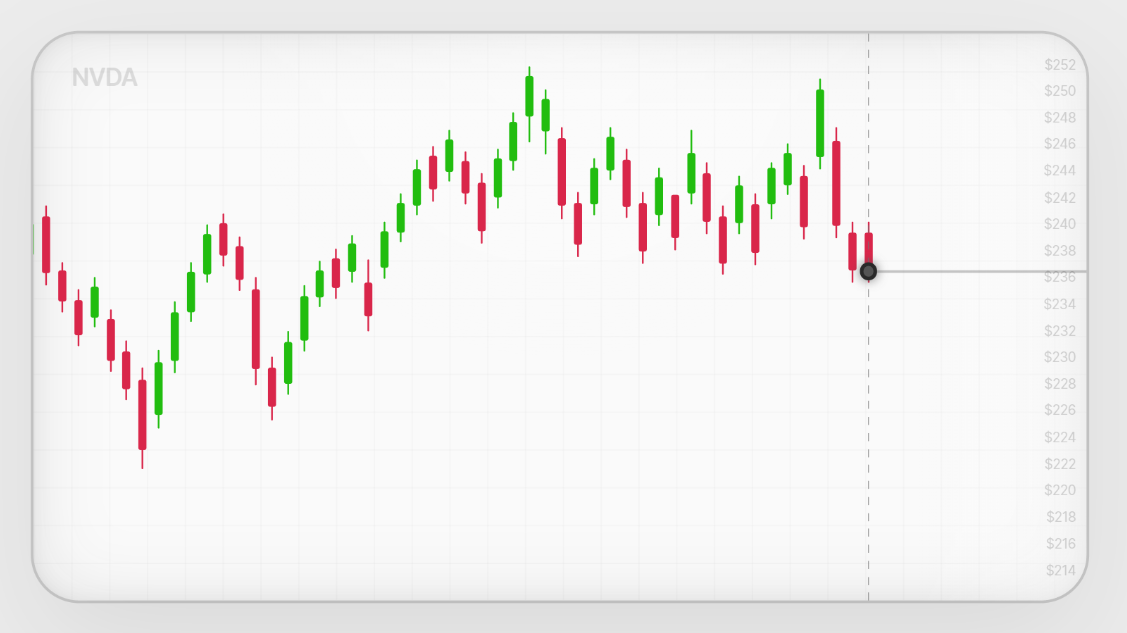
NVDA
Chart screenshot preview
screenshot.png

Stop guessing

Know everything
about the trade

Scantrader made a setup
Buy around $232.50Target: $244 · Stop Loss: $228
Potential: +$100 on $1,000Risk: -$38
SCNTRDR
$248$246$244$242$240$238$236$234$232.5$232$230$228$226$224
$$$$$$$$$$

Exact trade setup built from your chart screenshot by our advanced trading models.

87%Winrate

Backtested edge built from millions of real historical trade setups.

Get Started
TraderTraderTraderTraderTrader

Trusted by 5k+ traders

Real reviews

See how traders
are winning

Alex Rivera Scantrader review
+$12,400 Earned

"ngl i was pretty lost reading charts before this i uploaded one of my setups and it pointed out stuff i completely missed helped me not chase the entry"

Alex Rivera

New Trader
Maya Collins Scantrader review
+$4,200 Earned

"i mostly trade options and the biggest thing for me was seeing the risk before entering i passed on a few bad trades just because the plan made it obvious"

Maya Collins

Options Trader
Jordan Lee Scantrader review
+$900 Earned

"this actually helped a lot i threw in a chart before market open and it gave me a clean plan instead of me just staring at candles trying to guess"

Jordan Lee

Day Trader
Ryan Brooks Scantrader review
+$7,850 Earned

"used it on a swing setup i was about to take and it showed the trade was kinda weak waited for a better entry and honestly that saved me"

Ryan Brooks

Swing Trader
Emma Parker Scantrader review
+$2,900 Earned

"i’m still pretty new so most trading tools confuse me but this explained the chart in normal words and made the setup way easier to understand"

Emma Parker

Beginner Trader
Sienna Watson Scantrader review
+$11,250 Earned

"i like that it tells you where the idea is wrong not just where to enter that helped me stop holding trades that were clearly already dead"

Sienna Watson

Swing Trader
Stefan Igregio Scantrader review
+$3,450 Earned

"first tool i’ve used that didn’t make trading feel more confusing i just upload the chart and it breaks down what matters without all the extra nonsense"

Stefan Igregio

Beginner Trader
Get Started
TraderTraderTraderTraderTrader

Trusted by 5k+ traders

FAQs

Your Questions,
Answered

About Scantrader

Scantrader turns a simple stock chart screenshot into a full trade breakdown. You upload a chart, and Scantrader analyzes the setup using custom-trained advanced trading models assisted by artificial intelligence built around real chart structure, price action, support and resistance, trend behavior, momentum shifts, volatility, and dozens of technical indicators. Instead of trying to guess what the chart means, you get a clear breakdown of the possible entry, stop loss, targets, risk/reward, and why the setup may or may not make sense.

No. Scantrader is not financial advice, and it does not place trades for you. It is an advanced analysis tool made to help you understand the chart better before making your own decision. The goal is to give you a cleaner view of the setup, the risk, and the possible opportunity so you are not trading blindly or relying on random guesses.

You can upload clean screenshots from most popular charting platforms, especially TradingView-style charts. The best results come from charts where the candles, ticker, timeframe, price levels, and important zones are easy to see. Scantrader can work with different timeframes, so you can use it for quick intraday setups, swing trade ideas, or bigger-picture chart analysis.

Scantrader is built to give high-quality trade analysis by studying the visible chart structure and comparing many technical factors at once. It looks for things like trend strength, breakout quality, pullback zones, support and resistance, candle behavior, target room, and where the trade idea could fail. No tool can predict the market perfectly, but Scantrader try's to be as close as possible. Our models help you understand the setup faster and make a more informed decision instead of guessing.

Trade analysis

After a scan, Scantrader can show the detected stock, trend direction, setup type, possible entry area, stop loss, profit targets, risk/reward, key support and resistance zones, and a simple game plan. It is designed to make the chart feel obvious, even if you are newer to trading. You can quickly see what looks strong, what looks risky, and what price levels actually matter.

Yes. Scantrader can help turn a chart setup into an options-style idea by looking at direction, timing, target zones, and risk. It can help you understand what kind of move the chart may be setting up for, which is useful when thinking about calls or puts. Options are risky, so Scantrader should be used as an analysis assistant, not as a guaranteed contract picker.

Yes. Scantrader is built for normal people, not just professional traders. It explains the setup in simple language while still using advanced chart analysis in the background. Beginners can use it to learn what entries, stops, targets, support, resistance, and risk/reward actually mean, while experienced traders can use it as a fast second opinion.

Yes. Scantrader can analyze both short-term and longer-term setups depending on the timeframe in your screenshot. A 5-minute or 15-minute chart can be useful for intraday ideas, while a 4-hour or daily chart can be better for swing setups. The scan adapts to what the chart is showing, so the breakdown matches the timeframe you upload.

No. No real trading tool can guarantee profits. What Scantrader does is help you find clearer setups, understand risk faster, and avoid entering trades with no plan. The value is in seeing the possible opportunity, the danger zone, and the trade structure before you risk money.

Account & usage

Create an account, upload a chart screenshot, and Scantrader will generate a clear trade breakdown in seconds. You do not need to connect your brokerage account or set up anything complicated. Just screenshot the chart, upload it, and review the analysis.

No. Scantrader is designed to make advanced analysis feel easy to understand. You can use it even if you are still learning, because it explains what the chart is doing instead of throwing confusing trading terms at you. That said, you should still learn basic risk management before using real money.

Yes. You can scan different tickers, different timeframes, and different setups. This is one of the best ways to use Scantrader because you can compare ideas and see which chart has the cleaner setup, better risk/reward, and stronger structure.

Yes. If you need help with your account, scans, billing, or anything else, you can email support@Scantrader.app. We want Scantrader to feel simple, fast, and actually helpful, so support is there if something is not working the way it should.